Showing posts with label apps. Show all posts

The Leapfrog Learning Path app is now available at Apple's app store


If you've read my blog for any length of time you'll know that I'm a big Leapfrog fan. I love the way Leapfrog combines education and entertainment to make learning fun for kids! One of the things I love best about Leapfrog products is how they make it easy for parents to stay involved in their child's learning process, via the Leapfrog Learning Path online tool.  When you create a Learning Path account, you can add your children to your account and connect their Leapfrog devices to it, so you can keep track of what they've played and for how long.  But the Learning Path isn't just a virtual nanny: it also gives you insights into the skills your child is learning as she plays.  You'll even get recommendations on ways to extend the learning through activity suggestions and expert articles.  Short of looking over your child's shoulder, it's the best way to stay involved in your child's learning process!


Previously, the Leapfrog Learning Path could only be accessed online at http://www.leapfrog.com/en-us/learning-path -- but now, parents can take the Learning Path anywhere they go, with the new Learning Path app.  It's available for free on Apple's app store, and it just launched today.

If your child owns a Leapfrog device, such as a LeapReader, TAG, LeapPad, Leapster GS or LeapPad Ultra, downloading the Learning Path app is a no-brainer.  You can track your child's progress from your mobile device.

You can get tips and advice from the Leapfrog community, and share your own.


You can even access printables and other activities (although for some reason, it's not on the main menu.  You have to access it by touching the search icon.  I kind of wish it was a menu item on your child's profile, the way learning goals and community discussions are).  All the content you get is tailored to your child's age and ability.  What a great way to keep your child entertained on the go!

The Learning Path tracks your child's progress from infanthood to toddlerhood to preschool to the early elementary years (grades 2-3).  I do wish the Learning Path could be expanded to accommodate children in 4th and 5th grade (you can only add children up to grade 2/3).  Even though my boys are in 4th grade, I could still use the help and support that the Learning Path gives!


Disclosure: I did not receive a sample or monetary compensation for this post. The views and opinions expressed here are my own.

Pin It
Continue reading...

Giveaway: Introducing the new Room on the Broom app


Room on the Broom is one of the sweetest, cutest kids books I've seen in quite a while.  I love the idea of a smiling witch who does nice things for people (and cats, birds, frogs and dogs!), and I think it's a great way to introduce Halloween characters to very young children in a non-scary way.

Families who can't get enough of the witch, her friends and the dragon will be delighted to know that there's a new Room on the Broom app flying into mobile devices, just in time for Halloween.  The app has all of the Room on the Broom characters, interacting with kids in some fun observation and memory games.  I spent some time playing with the app, and it has more than enough activities to delight preschoolers, and more than enough whimsy to delight their parents.  I love how the illustrations in the app look like they flew straight out of the book!

About the app
There’s room on the broom for everyone in this high quality game app for 3–7-year-olds, featuring beautiful design based on Alex Scheffler’s original illustrations. Offering children a safe, entertaining and interactive experience they can enjoy time and time again, Room on the Broom Games provides eight imaginative activities that players can interact and explore within, while practicing early learning skills such as counting, creativity and literacy. Collectively, the games explore the world of Room on the Broom, complementing the experience of reading the book and watching the film. Key characters are featured and players get to help them fly, eat and explore their world. Designed to ensure players and parents feel comfortable and safe in the digital space, there are no in-app purchases.

The new Room on the Broom Games interactive app is available through the iTunes store for iPad, iPad Mini, iPhone and iPod Touch; and on GooglePlay and Amazon for Android devices, priced at $4.99.

Here are some of the games kids can play on the Room on the Broom app:

· Fly the magnificent broom – Whoosh! Join the gang on the magnificent broom and fly through the starry night sky. Take control and steer the broom to collect letters, which spell out a word!


· Dragon loves fries – The Dragon is hungry and is planning to have fries for his dinner! Feed the dragon fries and avoid the other falling objects from the sky!


· Windy day collecting game – It’s a windy day and Cat needs help collecting a few things, will you help? Be careful not to miss them!


· Drawing with stars – Light up your imagination by creating pictures in the night sky. Place the numbered stars where you wish and watch the witch transform it into a dot-to-dot picture.

· Join the stars – Fly through the air and connect all the sparkly stars to find the right image!


· Find the hat – The Witch has lost her hat! Is it behind the tree? Help Dog find the hat in the woods.

· Find the bow – The Witch has lost her bow! Is it in the hay? Help Bird find the bow in the field.

· Find the wand – The Witch has lost her wand! Is it under the lily pad? Help Frog find the wand in the pond.


Win a Room on the Broom Prize Pack
One lucky Bonggamom Finds reader will win a Room on the Broom Prize Pack that includes:

  • A copy of the board book from Penguin Group (SRP: $6.99)
  • The new Witch plush from Kids Preferred (SRP: $12.95).

Required Entry
Leave a comment on this post telling me your child's favorite Halloween character.

Extra Entries
For extra entries, you can do any or all of the following. Please leave a separate comment for each extra entry with a way to verify the entry (i.e. tweet link, blog post link, Facebook id, Twitter id, etc.).

1) Follow bonggamom on Blogger (1 entry)

2) Follow bonggamom on Instagram (1 entry)

3) Follow bonggamom on Pinterest (1 entry)

4) Pin this giveaway on any of your Pinterest boards(1 entry -- you can use the "Pin It" button at the bottom of this page!).

5) "Like Bonggamom Finds" on Facebook and write this on my wall (1 entry):
I entered the Room on the Broom witch plush giveaway! http://ow.ly/pHWBE

6) Tweet this (1 entry per day)
RT @bonggafinds Win a Room on the Broom book and witch plush! Enter by 10/26 at http://ow.ly/pHWBE


The Rules
This giveaway ends at 11:59PM PST on October 26 2013; I will draw a winner at random on October 27 and post their name after they confirm acceptance. Continental US residents only. For additional giveaway rules, click here.


Disclosure: Thanks to Three.Sixty Marketing & Communications for providing the giveaway prize pack as well as a second prize pack for me.  The views and opinions expressed here are my own.

Pin It
Continue reading...

You auto try Cars 2 Storybook Deluxe App


With the new Disney Planes movie coming out next week, there's bound to be a renewed interest in  the vehicles that started it all:  Mater, Lightning McQueen and the rest of the cast of Cars and Cars 2.  Although I'm disappointed that (Spoiler Alert!!!  Well, sort of.)  the Cars gang does NOT make an appearance in the movie, Planes is billed as "From above the world of Cars....", and you can't miss the similarities (all the cars in Planes look like they belong in Cars, all the planes in Cars look like they belong in Planes, and all the boats, blimps, and forklifts look like they belong in both worlds!  So kids are going to want to revisit the Cars and Cars 2 stories.  And just as kids will be reliving the story of Dusty Crophopper through the Disney Planes Storybook Deluxe, what better way is there to revisit Cars than with the Cars 2 Storybook Deluxe?

Cars 2 Storybook Deluxe came out a few years ago, but I only reviewed it recently, so it was interesting to see how the functionality compares with the newer Storybook Deluxe releases like Monsters University, Wreck-It-Ralph and Planes.  After playing around with it, it seems to me that this app is halfway between the regular, bare-bones e-storybook app and the more recent, more engaging, full-featured Storybook Deluxe apps.

Kids will definitely enjoy the storybook section of the app -- like all the other Disney e-books, it offers a choice of read-alone/read-along/voice recording modes, and it has great artwork and character voices.  There aren't as many interactive features (i.e. animation or movie clips), and instead of swiping their fingers, readers touch backwards and forwards arrows to turn pages.


Make sure you tell your kids to keep an eye out for the puzzle icon that appears on select pages throughout the e-book.  If they click on it, they will be taken to a puzzle game where they can reconstruct the illustration they were just looking at (note, the green doodles in the photo below are mine; I added them to the screen shot to show you what to look for!).


Likewise, if kids see a paint icon (see the photo below; again, the green doodles are mine), they can click on it to be taken to a painting game.


The puzzles and painting games are nothing new, but there is one feature in the painting app that I haven't seen before:  a "rainbow" palette tint that brings the artist's rendition of the scene to life wherever you touch your finger.  How cool is that?


The two games included with the app are as good as any of the games in the newer Storybook Deluxe apps.  The first, Tokyo Lights, is a memory game that reminds me of Bop-It or Simon Says.  Players have to imitate colored light flashing patterns that increase in complexity and number as the game goes on.  It's really challenging -- and addicting -- even for me!


The second game, Mater's Tire Toss, reminds me of Angry Birds: players try to slingshot one of Mater's tires into a barbed wire fence strung with hubcaps.

Players tilt their device to get the tire to hit as many hubcaps as possible (that's how you score points) and keep the tire up as long as possible.  Again, I thought this game was great -- very addicting and a lot of fun.

Cars 2 Storybook Deluxe definitely isn't as snazzy as the newer Storybook Deluxe apps, but the 2 games are so great, they save it from being "just an e-storybook".  And at $1 cheaper than the newer Storybook Deluxe apps, so it means affordable fun for the en-tire family :)


Disclosure: I received a free download of the app for review purposes. The views and opinions expressed here are my own.

Pin It
Continue reading...

Planes: Storybook Deluxe takes readers to new heights


The long-awaited companion movie to Disney's Cars and Cars 2 is almost here!  Disney's Planes is flying into theaters, and it's going to be great.  The kids and I saw an advanced screening of the movie two nights ago, so we know your kids are going to love it!  They will love it so much that they'll probably be pleading for Dusty tshirts, model airplanes, coloring books and storybooks.

Fortunately (okay, luck had nothing to do with it and Disney product development had everything to do with it), young Planes fans will be able to get their fill of Planes even after they watch the movie, with the release of Disney's Planes: Storybook Deluxe app.  It's part storybook, part game play, part card collecting, and all fun. It has so much functionality built in, it's well worth the price for young Disney fans in general and young Planes fans in particular.

There are 3 main sections to the app; I'll go through each one separately:

1) Read and Fly
This is the storybook portion of the app that takes readers through the story of Planes.  Like all of Disney's Storybook Deluxe apps, older kids can read the story on their own, and younger ones can listen to a narration or a recording of their favorite grownup reading the story.  And like all of Disney's Storybook Deluxe apps, this one does a great job of bringing the story alive through film clips, music, and animated art.

A new feature to this particular storybook is the way the app games are woven into the story.  At certain points in the story, readers are taken into Race and Fly mode, where they can take the controls behind Dusty (or any other character they've already unlocked) and go on some test runs. While I love the games (see the next section, Race and Fly), I'm not sure I like having to interrupt the story to play a game.  Not to worry -- if you or your child feels like me, you can always opt out of the game and return to the story.

2) Race and Fly

The Race and Fly section lets kids race Dusty and other Planes characters through the use of tilt-and-play technology.  There are a total of 16 games -- a combination of time trials, races, and practice course runs with varying levels of difficulty.  When you complete a game successfully, you earn a Jolly Wrenches badge (the skull and crossed wrenches icon that actually plays a big role in the movie).  Collect as many of these badges as you can, because you'll need them to unlock the more challenging games.

Initially, you'll only be able to play the games as Dusty Crophopper, but the more you play, the more characters you can unlock.  As you work through a game, you'll see flying oil cans that you can collect.  You can use these oil cans to unlock more characters to fly with in the game.

There are a total of 14 characters to unlock.  Ten of them -- Dusty, Ripslinger, El Chu, Ishani, Supercharged Dusty, Racing Dusty, Ned, Zed, Bulldog and Skipper -- can be unlocked by "spending" your oil cans (some characters require more oil cans to unlock than others).


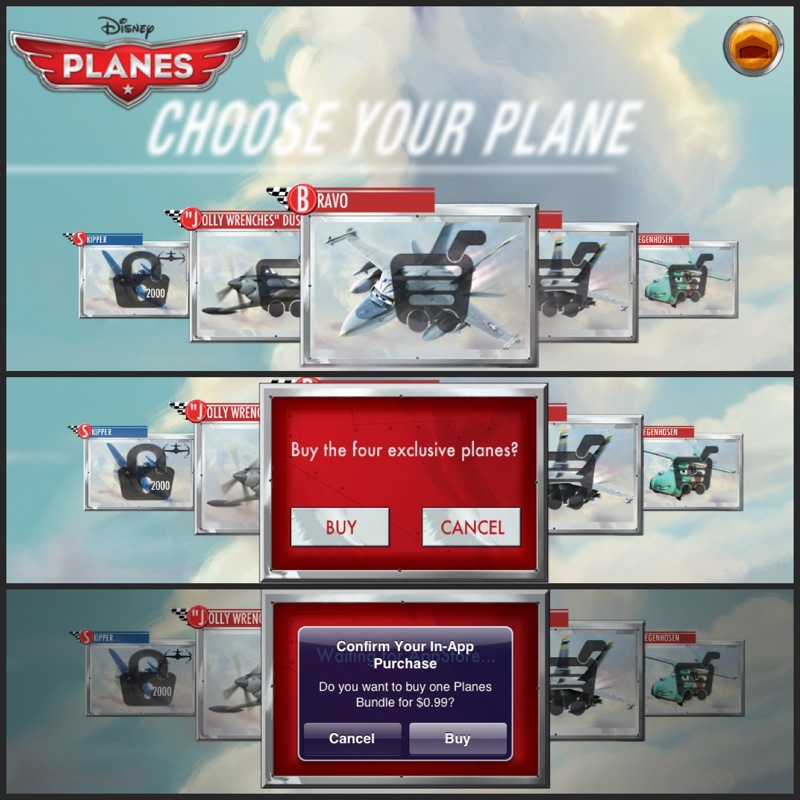
The final 4 characters --  "Jolly Wrenches" Dusty, Bravo, Echo and Liegenhosen -- can be unlocked by purchasing the Planes Read-Along Storybook and CD Bundle (available exclusively at The Disney Store and Disney Parks) and download the app using the code found on your storybook's inside cover.  If you don't have the Planes Read-Along Storybook, you can also purchase the 4 bonus planes via in-app purchase for 99 cents (I ended up purchasing them because one of my kids is absolutely mad about Bravo).

I give this games section a big thumbs-up.  I've really been enjoying the games in the newer Storybook Deluxe apps -- notably Brave, Monsters University, Cars 2, Wreck-It Ralph, and now Planes -- because each one is unique, each one is themed to the story, and each one is challenging and fun to play.  No more boring puzzles or coloring apps!

3) Scan and Fly
Kids can collect virtual Planes cards by holding their device up to any Planes logo (I did an image search and held our iPad up to my laptop screen).  Image recognition software will scan the logo and unlock a new card every day!


There are 10 cards to unlock and collect; they're displayed in the app's Adventure Album.


Each character card has a description of the character as well as a list of stats (height, wingspan, etc..). I'm a big fan of the card-collecting features in the newer Storybook Deluxe apps because it lets kids learn more about their favorite characters -- plus, they're fun to collect (and collecting them doesn't cost anything!).


You can download Planes: Storybook Deluxe from the App Store for $6.99, or purchase the Planes Read-Along Storybook and CD Bundle (available exclusively at The Disney Store and Disney Parks) and receive a code to download the app (plus the 4 special planes I mentioned before) for free!  The app is compatible with the iPhone, iPad and iPod touch.


Disclosure: I received a sample code to download and review the app. The views and opinions expressed here are my own.

Pin It
Continue reading...

Disney•Pixar Monsters University LeapPad Game: review and giveaway


The excitement is building for Monsters University! The sequel (or to be more precise, the prequel) to Monsters, Inc. opens in theatres on June 21, and this is one class that everyone wants to sign up for.  Unfortunately only monsters are allowed to enroll in Monsters University -- but there's good news for human children. Leapfrog has not one, but two great ways for kids to learn and play with Mike and Sulley:  the Monsters University game and book.

I've been a huge fan of Leapfrog's edu-tainment philosophy for years -- I can't tell you what a big help the Tag Reader and all its predecessors were in helping my kids learn to read, and learn to love reading -- so they sent me a review copy of both the new Monsters University game and book.  Check out my review of the Monsters University LeapReader book -- and enter to win both the game and the book!  This post contains my review of the Monsters University LeapPad game -- as well as the chance for an extra entry to my Leapfrog Monsters University giveaway!


About Monsters University Game for LeapPad and Leapster Explorer
In Disney•Pixar's Monsters University, winning the Scare Games will take more than a big roar—use your problem-solving skills to help Mike and Sulley! Using clever thinking and stealth maneuvers, make your way through different locations. Are your scare skills up to the challenge?


When you start up the game, a Campus Map helps kids easily navigate between the main game, mini games and extra features.


The main game challenges kids to become the best scarer ever. It has kids navigating their way across campus, through maze-like rooms -- the library, the frat house, the scare simulator, etc... --  in their quest to grab the pennant and collect coins, scare cards and room decor along the way.  There are 24 progressively difficult levels, and each level really puts kids' problem-solving skills to the test.
This is no ordinary maze -- you can't just look at a room and expect to make it across once you figure out the path.  You have to avoid other monsters (your competitors!), which makes it kind of like a Pac-Man game.  Instead of Pac-Man's vitamin pills, kids can utilize a number of strategies to distract or delay their opponents, like spinning globes to blind them or blowing out candles to hide. Kids have to solve logic puzzles and mini-games in order to unlock these shortcuts, so they really have to play and learn from their mistakes in order to progress -- kind of the way real people learn in real life!

There are also a couple of mini-games:  a Monster Matching game patterned after the classic memory game that automatically adjusts to your child's skill level, and a Guess Who game that challenges kids' deductive skills to figure out which monster holds the hidden key.  Both are easy, fast-paced and fun games that any kid will enjoy.


My favorite feature is the monster-maker, which lets kids mix and match monster body parts and come up with their own monsterrific creations.  They can even monsterize (or should I say monsterrorize?) themselves by taking their photo with the LeapPad camera and recording their own monster roars with the LeapPad microphone.


In addition, kids can collect virtual scare cards they can display in a Monsters University Scare Book, as well as virtual t-shirts, pennants and other Monsters U memorabilia they can display in their Fraternity Room!

How cool is that?

The Monsters University game can be purchased as game cartridge or as a downloadable app.  The game will work with both the LeapPad and the Leapster Explorer, but the in-game camera and microphone functions won't work with the Leapster Explorer.


Get free shipping on Leapfrog Monsters University products

Until June 30, get free ground shipping on orders that include any Disney•Pixar Monsters University product!  Use code MONSTERS (Offer valid through 11:59PM PT 6/30/2013).


Win a Leapfrog Monsters University Prize Pack
One lucky Bonggamom Finds reader will receive Leapfrog's Monsters University book for LeapReader/Tag and Monsters University game for LeapPad/Leapster Explorer!


To enter, read the rules and leave a comment on my Monsters University LeapReader/Tag book post.  For an extra entry, leave a comment on this post and tell me which feature in the game your child would enjoy the most!  Giveaway ends July 2, 2013.


Disclosure: I received a product sample to facilitate my review, but have not been paid to review the product or give my opinions. Thanks to Leapfrog for providing review samples and prizes for this giveaway. The views and opinions expressed here are my own.

Pin It
Continue reading...

Monsters University Storybook Deluxe


Monsters University Storybook Deluxe
I received a download code to review this app

Everyone in the family is so excited to see Monster's University!  Finding out how Mike and Sully learned to become monster scarers (and friends) at college is going to be so much fun.  To add to the excitement, Disney Publishing has just released a brand new app:  Monsters University Storybook Deluxe! It's available for $6.99 in the iTunes App Store for the iPad, iPhone, iPod Touch and iPad Mini.

Just like the other Disney Storybook Deluxe apps I've reviewed, Monsters University features interactive storybook art, voices from the film, Read-On-Your-Own or Listen-On-Your-Own reading options -- at least I think they do.  You see, I haven't tried the storybook feature of this app yet because I don't want any plot spoilers!  I want to watch the movie first, then go back and read the story.
Monsters University Storybook Deluxe

Even though I'm not going anywhere near the storybook mode just yet, I'm having so much fun with this app -- probably more than most of the Disney Storybook Deluxe apps.  Monsters University doesn't have coloring pages or puzzles like most of the others -- but what it does have is the coolest Monster ID maker ever.  You can take your photo or choose from a photo in your library, then Monsterify (or should I say "MonsTerrify") it with monster features.  I love that you can resize, rotate and discard any of the monster features to get exactly the look you want!


You can type in your name, draw your signature, choose your major (Scaring, Philosophy and Science are among the options) and choose your monster fraternity affiliation.  As you can see, I had WAAAAY too much fun with this.


The app also has a fun game you can play to collect monster cards.  Technically there are 5 games, but they're pretty much the same game:  you have to navigate through a room filled with obstacles (just the room and the obstacles vary) by tilting the iPad or iPhone to avoid the obstacles.


If you hit a total of 3 obstacles, the game ends.


If you make it to the other end of the room without hitting any obstacles, you get to climb onto a simulator child's bed and scare him by roaring -- yes, you literally have to roar (or make a loud sound) to fill up the scare can.


There's an easy level and a hard level.  If you complete a hard level, you get a virtual scare card!


You can choose to play the game from the point of view (POV) of a variety of players.  At first you'll only be able to play as Mike Wazowski, but you can collect other player cards by finding and tapping hidden "scream cans" throughout the story (I haven't read the story yet, which explains why I haven't unlocked any of the other player cards).


You can earn more scare cards by playing the game as a different player and completing a hard-level game.


You can unlock even more scare cards if you own the Monsters Inc. Deluxe Storybook app!


The game is more fun and challenging than it originally seems.  It took me at least a dozen tries before I could make it to the end of the room!  First-person POV games make me really dizzy but I was determined to get to that darn simulator kid and scare him :)

I haven't even gotten to the storybook part of Monsters University Storybook Deluxe, and I'm already enjoying it.  All the features in the Disney Publishing Storybook Deluxe apps were getting predictable, so it's so great to have such a unique and refreshing one that really makes it feel like it's a "Deluxe" app -- in other words, worth the money!


Disclosure: I received a sample code for download.. The views and opinions expressed here are my own.

Pin It
Continue reading...

Search This Blog

Bongga Posts

Bongga Tweets

I'm Going!

Blog Archive


Bonggamom Finds Copyright © 2009 Cosmetic Girl Designed by Ipietoon | In Collaboration with FIFA
Girl Illustration Copyrighted to Dapino Colada