Showing posts with label hi tech. Show all posts

Make your Valentine's Heart Beat Faster with Logitech Ultimate Ears


Still looking for a Valentine's Day present for your loved one?  How about something that will make him or her dance with joy: a Ultimate Ears (UE) portable speaker from Logitech!  UE speakers are truly the ultimate -- in sound, in portability, in quality.  With a UE MEGABOOM, UE BOOM, or UE MINI BOOM, you can take the party everywhere you go.

Logitech sent me a UE BOOM unit to review, and I didn't need any more than a day to decide that it's a keeper. The gorgeous design, fun colors, (I chose red and black, but it comes in a variety of fashionable colors), and great sound make it the perfect present for anyone who loves to listen and dance to music with friends.

The UE BOOM comes with a cool, hi-tech-looking cylindrical case, which houses everything you need -- the speaker, a connecting USB cable, and a charging plug.  The cable and plug slot nicely at the top and bottom, which makes it super easy to pack for travel.

The UE BOOM is just over 7 inches long, and about 2 and a half inches in diameter. You can easily hold it in the palm of your hand.  That portability came in really handy today, when I brought the UE BOOM to school with me today. I was able to carry it around, connect it to my phone via Bluetooth, and play music for the kids at lunchtime. The music came out loud and clear during our lunchtime dance party, and the kids loved it! It was perfect to take out into the middle of the field, where the school's regular speaker system can't reach.


One of the best things about UE speakers is that you can pair them up!  That's right, you use UE's Double Up feature to pair one UE speaker with a second, and control both of them right from your phone or tablet.  You can combine the two speakers to amplify volume, or you can use the pair as stereo speakers to get left and right stereo sound.  You can Double UP your UE BOOM with another UE BOOM, with a UE MEGABOOM (if you are running version 7x or 8x of the UE software), or with a UE MINIBOOM (if you are running version 5x or 6x of the UE software).

I actually own 2 UE MINIBOOM speakers, which Double Up nicely with each other, but I wanted to try Doubling Up one of the UE MINIBOOM speakers with my new UE BOOM speaker.  It was easy as pie -- just open the UE BOOM app, connect your UE BOOM, then select the Double UP option and add your second speaker (in my case, the UE MINIBOOM).  I haven't found any other wireless speaker that can connect two units at once via Bluetooth, and I think it's a fantastic feature.

Speaking of features, Double Up is just the beginning. Here's a list of UE BOOM features that I love:

  • Its 360-degree wireless speaker  blasts loud, insanely good sound in every direction. 
  • Whether you  stand it up in either direction or lay it down, it gives off amazing sound.
  • It has a 50-ft Bluetooth® wireless range so you're not shackled to your speaker.
  • Ultra-fast micro USB charging means you don't have to wait long to get the party started.
  • Its 15-hour rechargeable battery means you can throw a marathon party.
  • Its water and stain resistant (always great when you have kids!)

UE BOOM is just one of three options that Logitech offers for great wireless portable sound. If you want even more sound, you can go one step up with the UE MEGABOOM. If you prefer even more portability, check out the tiny but powerful UE MINIBOOM (read my review of the UE MINIBOOM!).

Disclosure: I received a product sample to facilitate my review, but have not been paid to review the product or give my opinions. Product information (in italics) is provided by the featured company/product. The views and opinions expressed here are my own.

Pin It
Continue reading...

Logitech Giveway: Win Holiday Goodies with Logitech's Holiday Scratcher


Who doesn't want hi-tech presents for the holidays?  Everyone I know does -- that's why I put up my hi-tech holiday gift guide a few days ago.  One of the items on my guide was Logitech's Bemo social video camera -- I even had a giveaway for the camera! That giveaway is over, but you still get a chance to win a little more holiday cheer... through Logitech's new holiday scratcher promo!

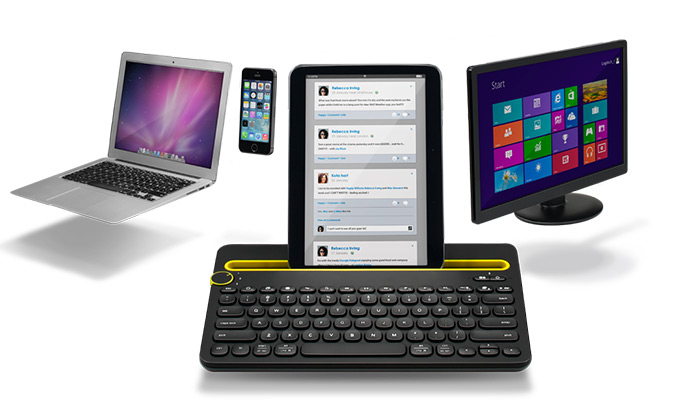
Logitech's digital “holiday scratcher,” is a great opportunity to win that perfect holiday gift from Logitech. Products include Bemo, Logitech Bluetooth Multi-Device Keyboard K480, Logitech Keys-To-Go, Logitech Wireless Mouse M325 (Color Collection) and more. Take it from me, you definitely want to win these: the wireless mouse is one of my favorite laptop accessories, and the Bemo is so much fun to use!

To enter, all you have to do is go to the holiday scratcher app on their Facebook page, and use a mouse (or your finger on a touchscreen device) to scratch away 3 circles.  If the images behind the 3 circles match, you win the item pictured in the images!  You get 3 chances every day, and you can earn more entries by sharing the promo with friends.

BUT WAIT..... you get another chance to win two of Logitech's hi-tech goodies right here!!

Win a Logitech Holiday Prize Pack

One lucky Bonggamom Finds reader will receive the following devices from Logitech:

Logitech Bluetooth Multi-Device Keyboard (K480) (MSRP $50)


Bemo Social Video Camera (MSRP $129)


Required Entry
Leave a comment on this post and tell me which Logitech item you would like to win

Extra Entries
For extra entries, you can do any or all of the following. Please leave a separate comment for each extra entry you complete, with a way to verify the entry (i.e. tweet link, Facebook id, Pinterest id, etc..)

1) Follow bonggamom on Blogger (1 entry)

2) Follow bonggamom on Instagram (1 entry)

3) Follow bonggamom on Pinterest (1 entry)

4) Pin this giveaway on any of your Pinterest boards (1 entry)

5) Like Bonggamom Finds on Facebook and write this on my wall (1 entry):
I joined the Logitech holiday giveaway on Bonggamom Finds!  Ends 12/15 http://ow.ly/EWSgo

6) Follow @bonggafinds on Twitter and tweet this once per day (1 entry per day):
Enter to win a Logitech wireless keyboard & Bemo social video camera! Ends 12/15 on @bonggafinds http://ow.ly/EWSgo

7) Tweet this once per day (1 entry per day):
RT @bonggafinds Play Logitech's holiday scratcher for the chance to win hi-tech Logitech goodies! http://ow.ly/EWROg

8) Join any open giveaway on Bonggamom Finds (1 entry for every giveaway you join).

The Rules
This giveaway ends at 11:59 PST on Dec 15, 2014. I will draw a winner at random on Dec 16 and post their name after they confirm acceptance. Continental US residents only. For additional giveaway rules, click here.


Disclosure: Giveaway prize provided by Logitech. The views and opinions expressed here are my own.

Pin It
Continue reading...

Hi-Tech Holiday Gift Guide: Saves and Splurges


Here in Silicon Valley, hi-tech is the only way to go!  Actually, that's true for the rest of the country as well!  After all, who wouldn't want a hi-tech gadget as a holiday present?  Here are my holiday picks for hi-tech holiday presents, for all budgets from save to splurge:


Yurbuds ($20-$50) -- big sound, small price!


iStabilizer Flex tripod ($29.95) -- for better selfies!


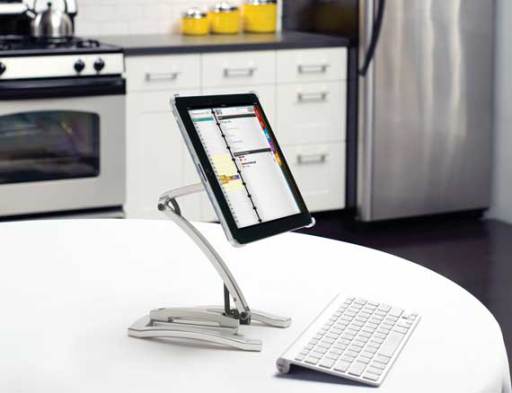
Sanus VTM1 iPad mount ($70) -- hands-free, fuss free reading at the breakfast table or while cooking!

Sharp Aquos Crystal phone ($135) -- it looks and feels like a high-end phone but only costs $135!


Bemo social video camera ($129) -- fuss free, spur-of-the-moment video recording!


Samsung Galaxy S5 ($500+ without contract)-- iPhone 6 plus?  Seriously, who needs it when you have the S5?


Harman Kardon Onyx Studio wireless speakers ($599) -- small homes can ditch the home speaker system in favor of the Onyx Studio and a smartphone!


Microsoft Surface Pro 3 ($799) -- everything I love about the iPad, plus a USB port!


Disclosure: I did not receive a sample or monetary compensation for this post.  The views and opinions expressed here are my own.

Pin It
Continue reading...

Leapfrog introduces the Leap TV system


Just like they do every year, Leapfrog is all set to conquer the holiday season!  Their latest product, the LeapTV gaming system, has already been recognized as one of the hottest holiday items for children by top retailers including Toys”R”Us, Walmart and Target on their Top Holiday Toy Lists. What's more, LeapTV has already won awards from known and trusted organizations such as Dr. Toy, The Toy Insider and the National Parenting Publications Awards program.

We recently reviewed LeapTV, and we can see why LeapTV is sure to be on every child's wish list -- it's educational, it's fun, it gets kids off the couch as they play... and it's available at your local retailers for $149.99.  Check it out!

So what is LeapTV?  LeapTV is an active, educational video gaming system specially designed for kids ages 3-8.  Kids can play a variety of fun, educational games that grow their minds and their bodies.  Families with older children playing on Wii U, Playstation or XBox will recognize the LeapTV's components easily:  a game console, a game controller, a camera, and game cartridges kids and insert into the console, or download via the internet. At this point in time, there are 9 LeapTV games, created by educators and tested by parents and kids; by the end of the year, there will be over 100 games available for the LeapTV!

Kids can play on the LeapTV gaming system in 3 ways:


Body Motion: Kids control on-screen action via physical movements.  The LeapTV camera captures kids' motion as they dance, jump, twirl, and hop.  These video games definitely don't turn kids into couch potatoes!


Leapfrog LeapTV

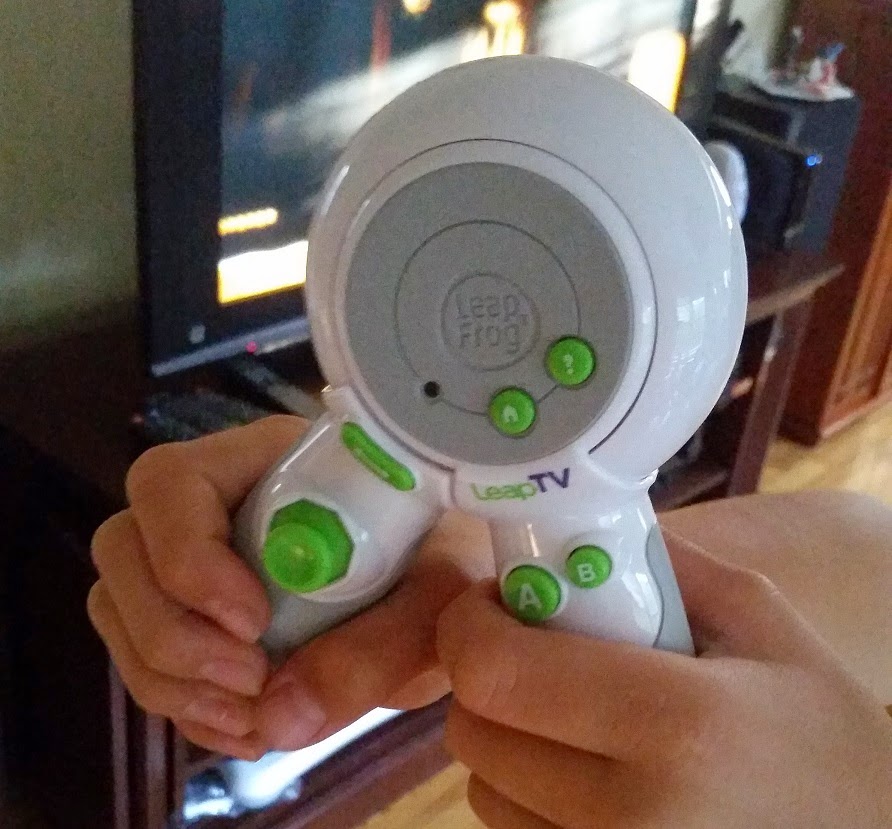
Classic Control: Kids use the LeapTV controller in its classic position -- with handlebars pointing down -- to control on-screen action.  The buttons on the controller allow them to toggle between selections on a menu and select items.  They can also shake and tilt the controller for games like Kart Racing or the Disney Pixar Pals learning game.
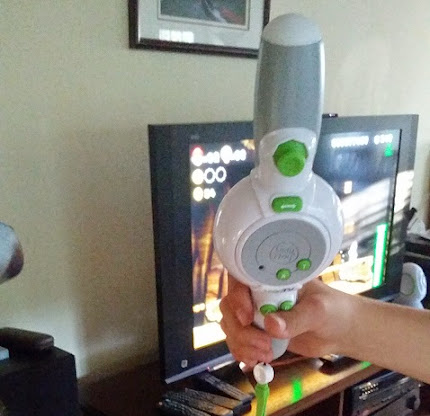
Leapfrog LeapTVPointer Play:  The LeapTV controller's handlebars swivel out to 180 degrees for even more motion-controlled fun! Kids hold the controller in pointer position like they would hold a tennis racket or play sword (great for games like Jake and the Neverland Pirates!).


Here's what I love best about LeapTV:

It's easy for little kids to play
Kid love to be independent, and LeapTV helps them do things on their own. The controller is sized and shaped so that little hands can hold it easily.  Simple visual interface and audio instructions makes it easy for pre-readers to follow along. And kids who own other Leapfrog products will welcome familiar characters like Leap and Tad, the pet characters on the Leapband, and more.

It's educational
My favorite feature in all Leapfrog products is the educational components. All Leapfrog games help kids develop important skills in reading, math, science, and problem solving, not to mention fine and gross motor skills.  Leapfrog works the educational component in so subtly and skillfully that kids barely realize they're learning.  For example, in the Kart Racing game, players have to solve math facts in order to build their race cars, then on the race track they have to figure out simple patterns in order to steer their race cars through the correct gate.
Leapfrog LeapTV


It's a system that grows with the child
Each child in your family can create an account to play with on LeapTV, so parents can keep track of what their kids are playing and what skills they are learning.  The games adapt to your child: they level up or down to keeps learning at levels that challenge them.  Two children (siblings! friends!) can even play the same game and are given challenges for their developmental level -- so for example, player 1 might be given addition problems while player 2 might be given simple number recognition problems.  Your child won't be outgrowing LeapTV for a long, long time!

Leapfrog LeapTV

I do have a few issues with LeapTV. First, game loading can be slow.  Second, my sons found the game consoles difficult to get working properly. The toggle switch requires a very light hand, otherwise you'll end up selecting something that you didn't want.  Other than that, I think it's a great system, and the sooner you buy it for your child, the better!


Disclosure:I received sample product to review. The views and opinions expressed here are my own.

Pin It
Continue reading...

Discover LG OLED TV at Best Buy: the Ultimate Holiday Gift!


This is a compensated post

The holiday season is here, and Best Buy is ready to fulfill your family's holiday wishes!  From video games to laptops to phones to televisions, Best Buy has all the gadgets and gizmos that are sure to appear on your family's holiday wish list.  Their great service and low prices mean you won't have to drive from store to store looking for the perfect present -- it's all available at Best Buy.

And what about a holiday present for the whole family?  Or for the person who has it all?  Best Buy has you covered for that, too!  This holiday, you can give the ultimate home theater makeover by gifting someone you love (and that includes yourself and your family!) with LG's newest technology, the LG OLED TV.

So what is OLED TV?  OLED stands for Organic Light Emitting Diode, which is the new technology used by OLED TVs.  OLED displays feature better refresh rates and contrast than LCD or plasma TVs, so they have better picture quality.  Also, OLED displays do not require backlighting, so OLED TVs can be thinner and lighter.  What's more, OLED TVs draw less power, so they're better for the environment. Simply put, OLED technology is light years ahead.


LG has taken OLED TV technology to the next level with their 55" 1080p smart OLED HDTV. It's only 0.17" thick at its thinnest point, with spectacular picture quality featuring Infinite Contrast and 4-color pixel technology (most TVs have only 3 colors, while LG added a 4th sub-white color pixel for the most vibrant colors!).  And get this: the screen is curved, so your eyes are equally distant from all parts of the screen when sitting in front of the TV!

Some great features of the LG OLED TV:
· Infinite contrast ratio and stunning color - delivers more natural, lifelike viewing.
· 4 Color Pixel technology enhances color range and accuracy.
· Super thin design (consider how to show visually)
· Find content faster with webOS


Visit Best Buy's LG OLED TV page for more details about OLED technology, the LG OLED TV, including stunning photos and a video of how OLED works. The LG OLED TV is available at Best Buy for an everyday price of $3499.99.

Can you imagine what an experience it must be to sit in front of an LG OLED TV and take it its display?  Just like your first kiss and the Grand Canyon, some things need to be experienced to be believed.  The LG OLED TV has a display that you won't believe until you see it, so head over to your nearest Best Buy and check it out!

Join the Best Buy LG OLED Twitter Party

Do you love twitter parties? Best Buy is hosting an LG OLED Twitter Party on Thursday December 4th at 7PM CST. Feel free to join this party for a chance to receive Best Buy gift cards and other great prizes. Tweet #HintingSeason with your top gifts that you want this Holiday from Best Buy.


Disclosure: The reviewer has been compensated in the form of a Best Buy Gift Card and/or received the product/service at a reduced price or for free. The views and opinions expressed here are my own.

Pin It
Continue reading...

Microsoft celebrates Fitness Day and the launch of the Microsoft Band


Keeping fit over the holidays is always a challenge.  Not only are there all kinds of holiday treats to tempt you, all those parties and events mean less opportunity to work out, less sleep, and more stress. It's always a good idea to get a workout in before things start to get busy -- and that's why Microsoft chose October 30, the day before Halloween and the start of the holiday season, to host a fitness day celebrating the launch of their latest fitness tracking gadget, the Microsoft Band.  #FitnessDay events were held at Microsoft Retail stores across the country, including Westfield Valley Fair Mall, one of my favorite local malls, so I put on my yoga gear and headed to the Microsoft Store for a few hours of fitness and fun!

Event staff and trainers were on hand all day, offering fitness tests and giving customers the chance to try out some of the fun fitness games on Xbox Kinect.


Stores hosted two free fitness classes: a high energy Zumba class at noon, and a stress relieving yoga class in the evening.


The first 150 customers were given a fun present (their choice of yoga mat, hat, water bottle, gym bag, or jump rope).  They had free jamba juice, Gatorade, water, and energy snacks.  And there were giveaways all day long.


You could pose with a variety of props and your souvenir photo was mailed you on the spot.


 The star of the day was the Microsoft Band, Microsoft's entry in the wearable fitness tracker market.


The Microsoft Band is nice and slim, but it has an elongated touchscreen display, not just a bunch of flashing lights. It's the ultimate in wearable fitness, tracking steps, heart rate, sleep patterns, UV sun exposure, and more.

It also functions as a smart watch, notifying the wearer of incoming texts, phone calls, new emails, Facebook updates, Twitter updates, weather, calendar alerts, and so much more (it syncs with your phone via Bluetooth).  There's even a Starbucks app that lets you pay for your morning capuccino.

The downside? Even in the short time that I tried it on, it feels extremely uncomfortable. It's semi rigid and I felt like it was pressing down on my pulse points.  It's possible that I wasn't given the right size, or I didn't adjust it properly, so don't quote me on that, just be aware of it.  Obviously this isn't an actual review of Microsoft Band since I didn't get to spend an extended period of time testing it! But it certainly seems worth checking out, especially with the holidays coming up.  What better way to be aware of how your day to day activities help your health and fitness goals!


Of course, shoppers can also check out all the other cool tech gadgets.  My eye was immediately drawn to the Surface Pro 3.  It's just like my Windows 8 laptop... only it's a touchscreen tablet with a removable keyboard!  I love that you can take the tablet and relax on your sofa with it to read a book or browse the internet or catch up on social media.  Then you can dock it onto the keyboard (additional accessory) to type up an email or work.  Surface is bluetooth compatible, so I can use a Bluetooth mouse (I've never liked track pads, I'm old fashioned that way). The tablet even has a USB port!  I think Alfie would love this for a Christmas present!  Actually, so would I!

This holiday season, get thee to a Microsoft Store to check out the Microsoft Band, the Surface, and other Microsoft products!


Disclosure: This is a compensated post. The views and opinions expressed here are my own.

Pin It
Continue reading...

Make fitness fun with the Samsung Galaxy S5 Sport


I participated in a campaign on behalf of Mom Central Consulting (#MC) for Sprint. I received a product sample to facilitate my review and to thank me for participating.

Alfie and I recently did one of those online quizzes that predict your life expectancy.  I got 97.  Not bad, right? Well, Alfie got 104.  Are you kidding me???  Aren't women supposed to live longer than men?  Why don't I get to live to 100??  Alfie laughs at me and tells me I'm taking this way too seriously and that stressing about it is actually shaving years off my life.... but my competitive instincts have kicked in.  There's no way he's outliving me!  So I'm reexamining my lifestyle choices and resolving to make little tweaks to give me the best chance at a long, healthy life:  Eating less refined carbs.  Letting go of stress.  Getting more sleep.  Working out more.

To help me stay motivated for workouts, Alfie has been nagging me to download a fitness app onto my phone, but for some reason I've resisted.   But a couple of weeks ago I received a Samsung Galaxy S5 Sport smartphone as part of the Mom Central SprintMom Ambassador Program.  This isn't your regular S5, it's a special Sport version -- and it's fantastic!  Sprint actually teamed up with Under Armour and MayMyFitness to integrate special fitness solutions right into the S5 Sport:
  • Samsung's exclusive Activity Zone app is preloaded on the S5 Sport.
  • The S5 Sport features a textured body that makes it easier to hold when you're sweating, and hard keys (instead of touchscreen keys) that make it MUCH easier to operate the phone while you're working out.
  • The S5 Sport comes gives you 12 months of free MapMyFitness MVP.
  • The S5 Sport comes with S Health, a mobile health platform that helps you keep track of food intake and even monitor your heart rate!

Even without all the fitness features, the Samsung S5 Galaxy is a winner.  Here are some of my favorite features:

  • 5.7 x 2.9 x 0.4 inches, 5.6 ounces, 5.1 inch Full HD Super AMOLED® display
  • 16GB internal memory, Android™ 4.4.2, KitKat, 2.5GHz quad-core processor
  • Sprint Spark™ network enhances the phone's LTE service and allows for high quality videos.
  • Dual Cameras; a 16-megapixel rear-facing Phase Detection Auto Focus camera with Zero Shutter Lag, flash and video capture, and 2-megapixel front-facing camera with full HD recording at 30fps
  • Smart Remote feature allows you to use it as a remote control with your home theater equipment

And don't forget, Sprint Framily Plan users get six months free subscription to Spotify Premium!


I loved using the Samsung Galaxy S5 Sport!  I have no idea why it took me so long to start using MapMyFitness!  I can record all my workouts and fitness activities.  Even something as simple as walking to school counts, and I can see how active I've been all week -- distance, pace, speed, elevation, calories burned, route traveled.  Keeping records and measurements has always been key to keeping me focused and motivated with my workouts, and the free 12-month premium subscription to MapMyFitness MVP couldn't be handier.


Did you notice that I said "I LOVED using the Samsung Galaxy S5 Sport"?  That's because The Pea fell in love with it and begged me and begged me to let her have it!  She loves the large screen size and the amazing camera!  How could I say "no" to that sweet face?  Especially since the S5 Sport is helping her become more active!

Note: Phone cases for the Samsung Galaxy S5 will NOT work with the S5 sport -- the size is all wrong and the buttons are in different places. And since the S5 Sport is so new, there aren't too many phone cases available.  The "made in China" phone covers I found on Amazon and eBay are ugly and bulky, so I highly recommend purchasing a case from your local Sprint store or from Sprint online.  They have good cases from Body Glove and Tech 21.  I bought the clear Tech 21 Impact Mesh Case because it had the sleekest profile (The Pea didn't want any bulky cases but I insisted she get a case to protect the phone from drops and falls) and a cool color combo (clear with orange highlights, which lets the electric blue color shine through!).


Check out some other great phones on the Sprint Network:


Disclosure: I participated in a campaign on behalf of Mom Central Consulting (#MC) for Sprint. I received a product sample to facilitate my review and to thank me for participating. Product information (in italics) is provided by Mom Central. The views and opinions expressed here are my own.

Pin It
Continue reading...

Take your music from Solo to Social with Flips Audio headphones


Flips Audio headphones

My kids love listening to music when they do their homework, but when you have 3 kids, each with their own playlists, that doesn't always work.  Good headphones are always a nice thing to have -- and it's even better when those headphones double as HP speakers when they want to share their tunes with their friends!  Flips Audio are the first heaphones that transform from regular heaphones to HD speakers.  I recently received a pair to review, and I give them an A+!

At first glance, they seem like your run-of-the-mill premium headphones:  sleek design, comfy cushioned ear cups, great sound quality.
Flips Audio headphones


But wait!  You can flip the ear cups to face outwards, and all of a sudden, you have a pair of HD speakers that deliver great amp'd-up sound, NOT the tinny sound you'd get if you were to take your headphones off and crank up the volume to maximum.  It's the first of its kind -- you can listen to your tunes by yourself, then take your headphones off and share your tunes with everyone around you.  Whether you listen alone or out loud, you'll enjoy the highest audio quality!
Flips Audio headphones


When you're done, the headphones fold up nicely into a zippered case.  The case is a super lightweight fabric shell that keeps the headphones from getting scratched or beat up or broken, so you don't have to suffer the pain and frustration of spending for a replacement after it's accidentally knocked off the coffee table!
Flips Audio headphones


Best of all, at $120 MSRP (and I've seen them on sale for less than $100 at Wal-Mart!), Flips Headphones don't cost an arm and a leg like many high quality audio heaphones.


Disclosure:  I received a product sample to facilitate my review, but have not been paid to review the product or give my opinions. The views and opinions expressed here are my own.

Pin It
Continue reading...

Search This Blog

Bongga Posts

Bongga Tweets

I'm Going!

Blog Archive


Bonggamom Finds Copyright © 2009 Cosmetic Girl Designed by Ipietoon | In Collaboration with FIFA
Girl Illustration Copyrighted to Dapino Colada